Setting up a toll-free number sounds simple until you actually try to verify it and get stuck in delays or confusion. 📞
If you’re looking to quickly set up and verify a toll-free number without mistakes, you’re in the right place. This guide walks you through the exact steps, what to expect during activation, and how to avoid common verification issues. 🔥
By the end, you’ll not only have your number ready but also understand how to get it approved for SMS without unnecessary delays. Let’s get started and set everything up the right way 👇
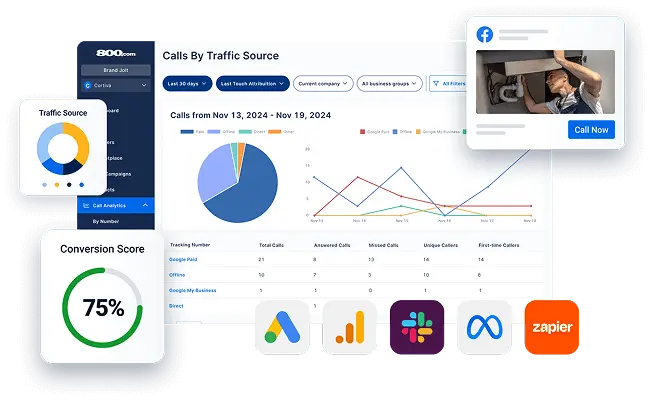
📌 What You Need Before Setting Up a Toll-Free Number 📋✅
Before you even log into your 800.com account, you need to gather a few things. Most people skip this step, and that’s why they end up waiting days for support tickets that could have been avoided. 🕰️😫
Here’s what you’ll need in front of you:
- Your Business Information 🏢: This includes your legal business name (not your DBA, unless it’s registered), your EIN (Employer Identification Number) or Social Security Number if you’re a sole proprietor, and your business address. Don’t use a PO Box unless you want your verification rejected. I made that mistake once, and it cost me three extra days. 🚫📬
- A Destination Number 📞: A toll-free number is just a forwarder. You need to know where the calls will go. This is usually your existing office line, a mobile phone, or a VoIP system. Have that number ready.

- A Clear Use Case 🎯: This is huge. When you go through verification, especially for SMS, the carrier wants to know what you’re sending messages about. If you’re running a plumbing business, you’ll say “appointment reminders and service updates.” If you’re vague like “customer communication” you’ll get flagged. Be specific! 🔍
- A Clean History 🧹: If you’re porting an existing toll-free number from another provider, make sure it isn’t flagged for spam. In my experience, numbers that were previously used for high-volume marketing often get stuck in a “pending” purgatory because of their reputation. If you’re buying a new number through 800.com, this is usually less of a problem. 👍
Having these items ready before you click “activate” will save you at least 48 hours of back-and-forth emails. Trust me on this one. 💪⏱️
📌 How to Choose and Activate a Toll-Free Number (800.com Guide) 🔍💡
When you first land on 800.com, the interface feels pretty intuitive. They’ve done a good job making it look simple. But the “simple” part is where you pick your number. The real work comes after. 😅
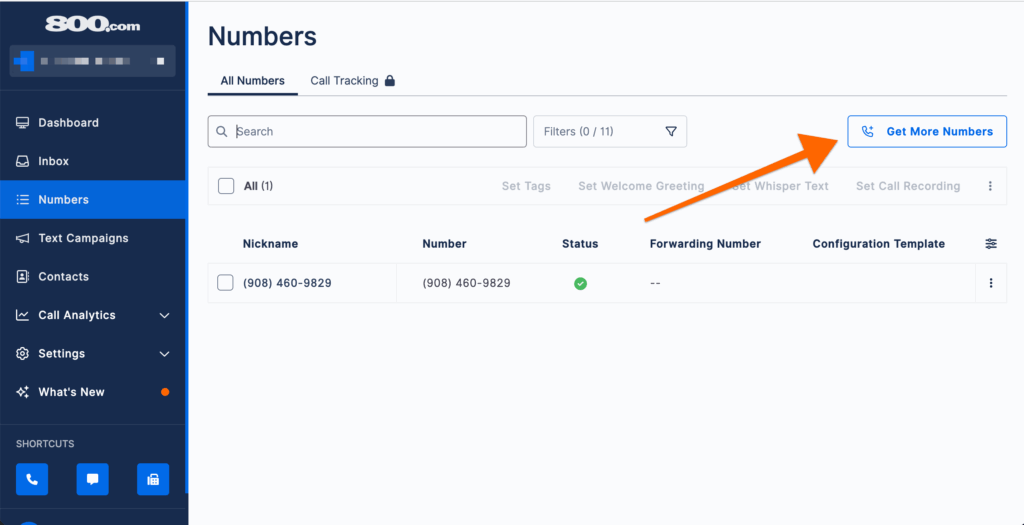
The Search Process 🔎
You’ll see a search bar. Type in a word, phrase, or sequence you want. For example, if you’re a florist, you might search for “1-800-FLOWERS” (though that one is taken, obviously). The platform will show you available numbers. 🌸📞
Pro tip: Don’t fall in love with one specific vanity number. The really good ones are expensive or already owned. Instead, look for numbers that are easy to remember.
In my experience, patterns like “800-XXX-8888” or numbers that spell out your business name are worth the extra cost because customers actually remember them. 🧠💎
Adding to Cart 🛒
Once you find a number, you add it to your cart. Here’s where 800.com differs from some other providers: they make you select a plan during checkout.
You’ll see options for “Essentials” or “Pro.” If you plan to use SMS texting from this number (which you should it’s 2026, customers want to text 📱💬), make sure the plan includes SMS features. I’ve seen people buy the voice-only plan and then wonder why their verification for texting fails. 🚫✉️
After you pay, you don’t actually “have” the number yet. You’ve reserved it. Now comes the activation. 🎯
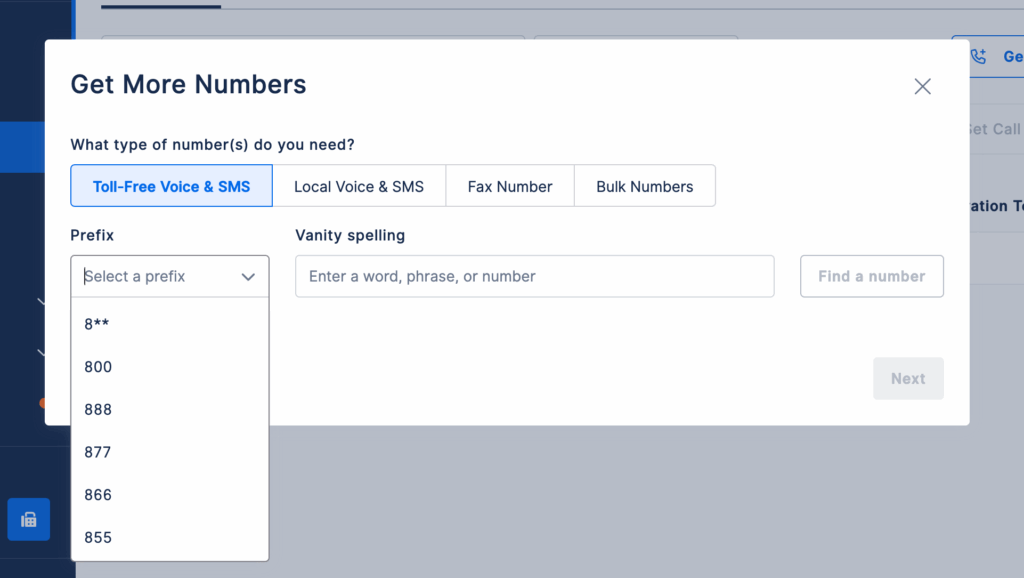
📌 Selecting Your Number and Setting Up Call Forwarding 🔄📲
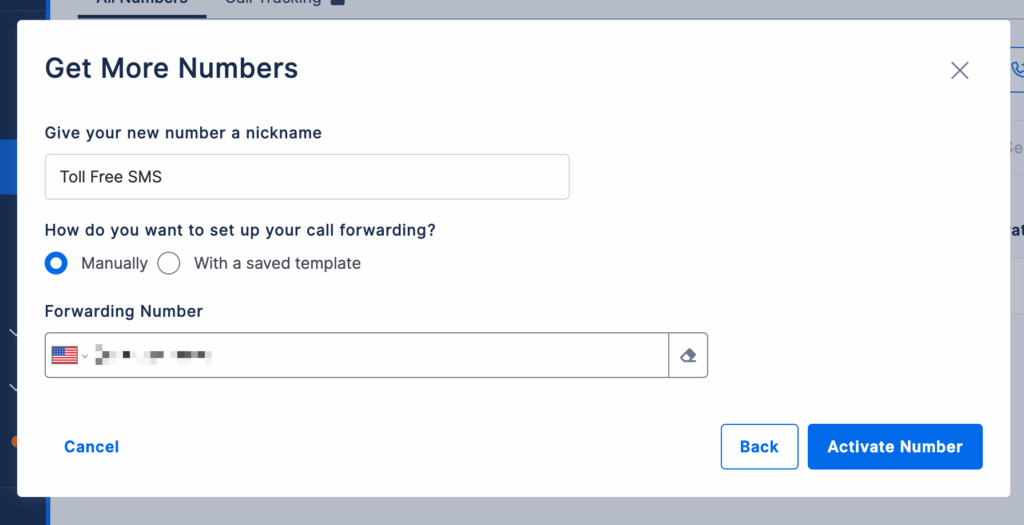
Okay, you’ve paid, and you’re in the dashboard. This is where most people get stuck because they assume the number just “works” immediately. It doesn’t. You have to point it somewhere. 🧭
Setting Up Call Forwarding ⚙️
Once you’re logged in, find the section labeled “Voice” or “Call Handling.” You’re going to tell the system where to send the calls.
Here’s the step-by-step I use every time:
- Click on “Numbers” in the left sidebar. 🖱️
- Select the toll-free number you just purchased. ✅
- Go to “Voice Settings” or “Call Forwarding.” 🔧
- Enter your destination number. This is the number you want to ring when someone calls your 800 number. It could be your cell phone, your office landline, or a VoIP extension. 📱🏢
- Test it. Immediately. Don’t wait for “activation.” Dial your new toll-free number from a different phone (not the destination phone) and see if it rings. If it doesn’t, double-check the destination number format. You usually need to include the country code (e.g., 12125551234). 🔄📞
A real-world insight: If you’re forwarding to a cell phone, be aware that call screening features on iPhones or Androids (like “Silence Unknown Callers”) might block your forwarded calls.
I learned this the hard way when I spent two hours troubleshooting why my 800 number was “broken,” only to realize my iPhone was sending the calls to voicemail. 🤦♂️📱 Add your toll-free number to your contacts to avoid this. ✅
📌 How Long It Takes to Activate a Toll-Free Number (24–48 Hours) ⏰⌛
This is the part where patience is required, but let me set realistic expectations. 🧘♂️
For voice calls only, activation is usually fast—often within a few hours. I’ve had numbers go live in under 30 minutes! ⚡ But 800.com and other providers will tell you “24–48 hours” because sometimes the upstream carriers (the guys who actually own the infrastructure) are slow. 🐢
If you’ve set up forwarding correctly and the test call worked, you’re done for voice. ✅ But if you plan to use SMS/Texting from this number, the clock is just starting. Voice activation and SMS verification are two completely separate processes, and that’s where the real waiting game begins. ⏳📱
📌 Why Toll-Free Number Verification Is Required for SMS 🔐📨
If you’re wondering why you can’t just buy a number and start texting customers immediately, you’re not alone. I was frustrated by this too. 😤 But there’s a good reason. 🧠
A few years ago, scammers and spammers realized they could buy toll-free numbers and blast out millions of spam texts. 📨💥 The carriers (AT&T, Verizon, T-Mobile) got sick of it. So now, they enforce Toll-Free SMS Verification. Think of it as a background check for your number. 🕵️♂️✅
If you try to send a text from an unverified toll-free number, one of three things will happen:
- The message will fail to send (you’ll see an error in your dashboard). ❌
- The message will go through, but it will be flagged as “Spam Likely.” 🚩
- The number will get suspended entirely. 🚫📵
Verification is required because the carriers want to know you’re a legitimate business. They want to know that you have permission to text the people you’re texting. It’s annoying, but it actually protects your business reputation.
If you skip verification, your messages won’t reach customers, and you’ll just be wasting money on a number that doesn’t work for text. 💸😩
📌 How to Verify a Toll-Free Number (Step-by-Step Guide) 📝🔧
When I first did this, I was overwhelmed by the forms. 😵 But it’s actually straightforward once you know where to click. Here’s the exact process I follow using the 800.com platform and the underlying carrier network (Sinch, which handles most of their SMS backend). 🚀
Step 1: Navigate to SMS Settings 🧭
In your 800.com dashboard, go to the “SMS” or “Messaging” section. Click on your toll-free number. You’ll see a status indicator. If it’s red or says “Unverified,” that’s your starting point. 🔴⚠️
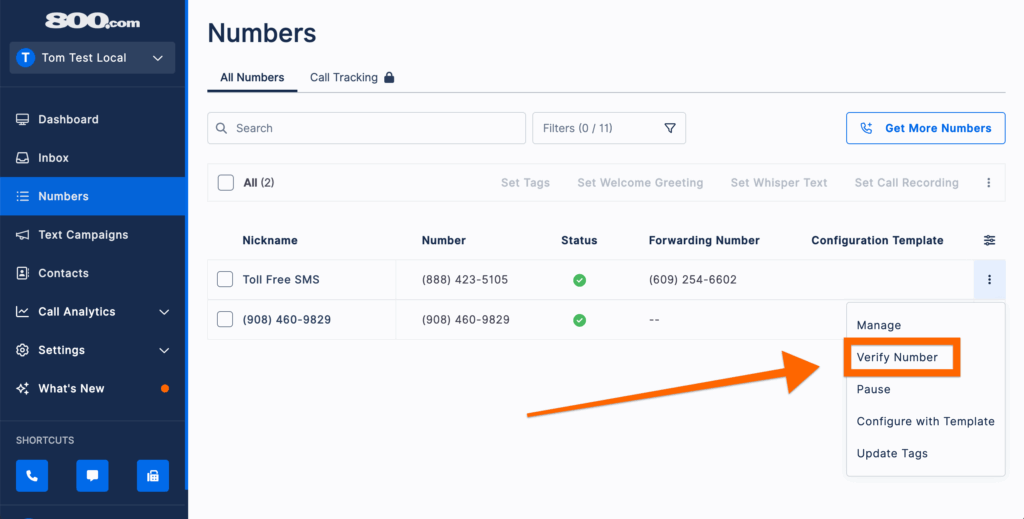
Step 2: Initiate the Verification Form 📋
Click “Verify” or “Start Verification.” This will open a web form. Do not close this tab. If you close it, sometimes the data doesn’t save, and you have to start over. I’ve done this twice. It’s painful. 😫🚫
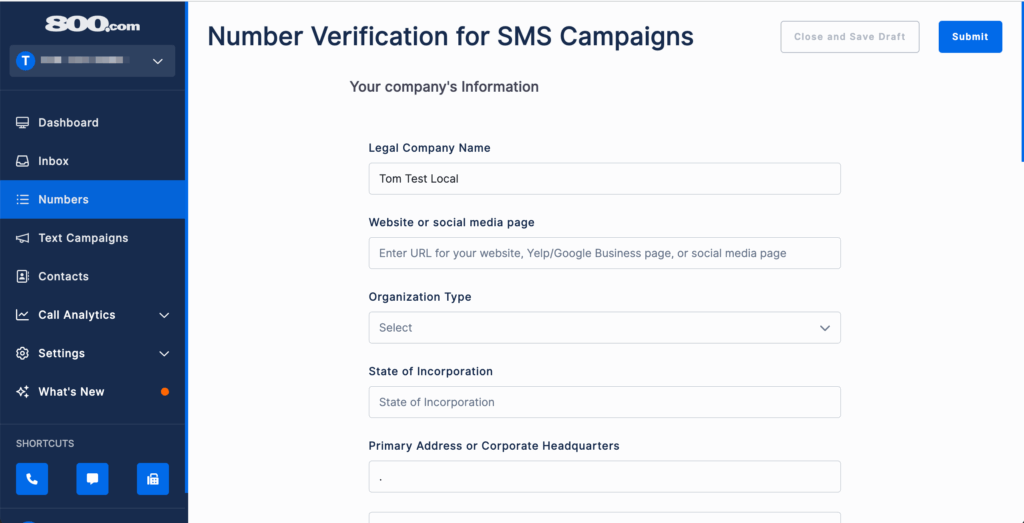
Step 3: Fill Out the Business Information 🏢✍️
This is where you use the documents I told you to gather earlier. You’ll need:
- Legal Business Name: Exactly as it appears on your tax documents. 📄
- Business Address: Physical address. No PO Boxes. 🏠
- EIN or SSN: If you’re a sole proprietor using an SSN, that’s fine, but be prepared for a slightly longer verification. 🔢
- Business Type: Is it a corporation, LLC, non-profit, or individual? 🏛️
Step 4: Define Your Use Case 🎯💡
This is the most critical section. The form will ask you to describe how you plan to use SMS. You cannot say “general marketing” or “customer service.” You have to pick from specific categories like:
- Marketing: Promotional messages, coupons, sales alerts. 📢💰
- Customer Care: Support tickets, troubleshooting, live agent chats. 🛠️💬
- Appointment Reminders: Confirmations, rescheduling, reminders. 📅✅
- Two-Factor Authentication (2FA): Security codes. 🔐
Here’s the insider tip: If you say “Marketing,” the scrutiny is higher. Marketing messages have the highest spam complaint rate. If you can honestly categorize your use as “Customer Care” or “Appointment Reminders,” do it. In my experience, those verifications go through faster because carriers view them as lower risk. 🚦⚡
Step 5: Provide Message Samples ✉️📝
You will be asked to provide 1–3 examples of the messages you plan to send. This is not a suggestion; it’s mandatory. 🚨
Be specific. Instead of writing “We will send appointment reminders,” write:
“Hi {CustomerName}, this is a reminder for your appointment with {BusinessName} on {Date} at {Time}. Reply CONFIRM to confirm or RESCHEDULE to change.” 💬✅
Show them you’re using opt-out language (like “Reply STOP to opt out”) because that’s required by carrier regulations anyway. 🛑
Step 6: Submit and Wait ⏳🤞
Once you hit submit, the verification request goes to the carrier network. You’re done with the active part. Now, you wait. ☕😌
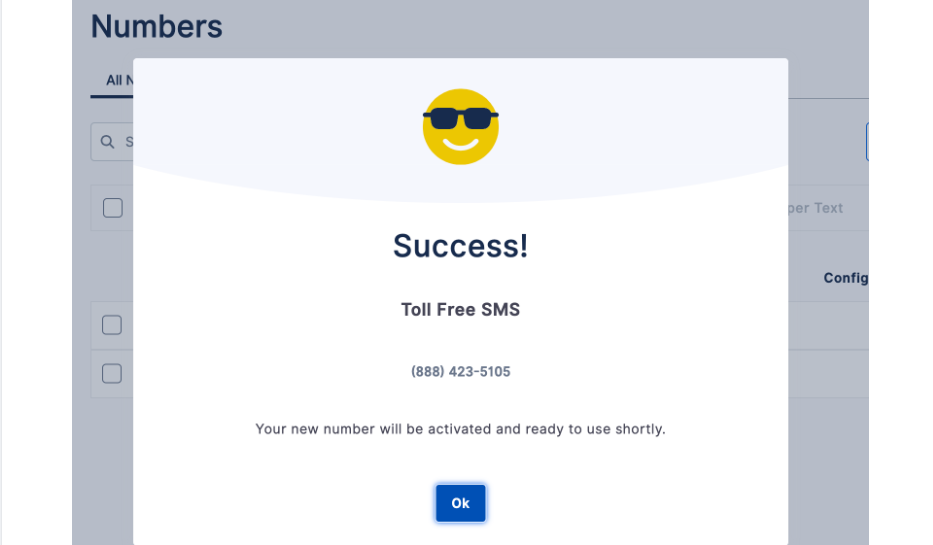
Once you are ready to activate your number, it is worth checking whether an 800.com coupon code is available before completing signup.
📌 Details and Documents Required for Toll-Free Verification 📑🔍
Let’s get into the nitty-gritty because this is where verification gets rejected. 🚫😬
You don’t always need to upload a document, but sometimes you do. If your business is new (less than 6 months old) or if you’re an individual/sole proprietor, expect to upload:
- Proof of Business Formation: Articles of Incorporation, LLC filing, or a business license. 📜🏢
- Website URL: If your business doesn’t have a website, this can cause a delay. The carriers will check to see if the website matches the business name and address. If you’re a home-based business, just be honest. I’ve verified numbers for home-based consultants just make sure your website has a clear privacy policy and contact page. 🌐✅
- Privacy Policy Link: If you’re collecting phone numbers from customers, you need to have a privacy policy on your website that states how you use their data. 📝🔒
Why this is mandatory: The carriers are complying with CTIA (Cellular Telecommunications Industry Association) guidelines. These guidelines exist to prevent illegal robocalls and spam texts. If you don’t have a privacy policy, the carrier assumes you’re going to sell the phone numbers you collect, and they will reject your verification. 🚫📞💸
📌 How Long Toll-Free SMS Verification Takes (1–2 Weeks) ⏰📆
I’m going to be brutally honest here: the timeline you see on the website says “1–2 weeks,” but it can vary wildly. 🎢😅
- Standard timeframe: 5–7 business days. 🗓️
- If you have all your documents perfect: Sometimes 3–4 days. ⚡
- If there’s a rejection or a typo: Add another 3–5 days for the resubmission process. 🔄😩
During this time, you can usually still make and receive calls, but SMS will not work. You cannot send or receive text messages until the status changes to “Verified” in your dashboard. 🚫📨
I’ve learned to always submit my verification request immediately after purchasing the number even if I don’t plan to use SMS for a few weeks. That way, by the time I’m ready to launch a campaign, the number is already fully functional. 🧠✅🚀
📌 What Pending Verification Status Means ⏳🤔
You’ll log in every day (like I did) and see the word “Pending.” What does that actually mean? 🤷♂️
“Pending” means your application is in a queue. It’s been submitted to the Toll-Free Messaging aggregator (like Sinch or Twilio, depending on who 800.com uses for the backend). From there, it goes to the major carriers (AT&T, Verizon, T-Mobile, etc.). 📤📡
Sometimes, it gets stuck in “Pending” because:
- One of the carriers is slow to respond. 🐢
- The system flagged something in your application for manual review. 🧑💻🔍
- The use case you selected triggered a deeper look. 🎯👀
What you can do: Don’t submit multiple verification requests. I’ve seen people get frustrated and click “Resubmit” three times in a week. This actually pushes your application to the back of the queue. Submit once, and then be patient. 🧘♂️🙏
📌 Common Mistakes That Delay Toll-Free Verification 🚫⚠️
If you want to avoid the 2–3 week horror stories, avoid these mistakes. I’ve made a few of these myself, and they cost me valuable time. 😬💸
1. Inconsistent Business Information 🔄🏢
This is the #1 reason for rejection. If your 800.com account has your business name as “John’s Plumbing LLC,” but your verification form says “John’s Plumbing,” and your website says “John’s Plumbing Services,” the system flags it as inconsistent. Use the exact legal name everywhere. 📝✅
2. Vague Use Case Descriptions 🤷♂️
I mentioned this earlier, but it’s worth repeating. “We will text customers” is not a use case. The carriers want to see intent and compliance. If you can’t explain what you’re texting about, they assume the worst. 🚨❌
3. Missing Opt-Out Instructions 🛑✉️
In your message samples, you must include language that allows the recipient to stop messages. Phrases like “Reply STOP to cancel” or “Text HELP for support” are mandatory. If you don’t include these in your samples, your verification will be rejected. It’s not a suggestion; it’s a hard requirement. 🚫📨
4. Using a Free Email Domain 📧⚠️
If you submit your verification using a Gmail or Yahoo email address as your primary business contact, it raises a red flag. 🚩 Use a business email address (e.g., [email protected]). If you don’t have a business email, set one up before you submit the verification. It signals legitimacy. ✅🏢
5. High-Risk Industries 🚫🔥
Certain industries are heavily scrutinized and often require additional documentation. These include:
- Debt collection 💰🚫
- Cannabis or CBD 🌿⚠️
- Gambling 🎰🚫
- Cryptocurrency ₿⚠️
- Adult content 🔞🚫
If you operate in one of these industries, your verification will take longer, and you may need to provide extra proof of compliance. I’ve seen cannabis-related businesses take 3–4 weeks for verification because the carriers are extra cautious. 🌿⏳
📌 Final Thoughts on Setting Up and Verifying a Toll-Free Number 💭✨
Setting up a toll-free number is one of the best moves you can make for your business. It instantly adds credibility. When customers see an 800 number, they associate it with established, professional businesses. 🏆📞 But the process isn’t just about picking a cool number and plugging it in.
From my experience, the key to a smooth setup is preparation. 🧠✅
If you have your business documents ready, your use case clearly defined, and your message samples written with opt-out language, you can bypass most of the common delays. 🚀
Remember: 📝
- Voice activation is fast (a few hours to 2 days). ⚡
- SMS verification is slow (1–2 weeks) but mandatory for texting. ⏳📨
- Consistency across your business name, address, and website is non-negotiable. 🔄✅
- Patience is required, but proactive preparation prevents rejection. 🧘♂️💪
If you’re using 800.com, their support team can actually help you check the status of your verification if it’s been sitting in “Pending” for more than 10 business days. Don’t be afraid to reach out sometimes a manual nudge from support can move things along. 🤝📞
Now, go grab that toll-free number and get verified. Your customers are waiting to hear from you and text you. 😊📱💬
Must Read:-
- Try 800.com Free Trial 2026: 30 Days of Unlimited Calling
- 800.com Review 2026: Worth It? Full Breakdown Inside
📌 FAQs
Q1: Can I use my 800.com number immediately after buying it?
Ans: You can start the setup right away, but it usually takes 24–48 hours for the voice line to fully activate across all networks. ⏳
Q2: Is SMS verification mandatory for sending texts?
Ans: Yes! In 2026, carriers will block unverified business texts. You must complete the Toll-Free Verification to send SMS campaigns. 🛡️
Q3: How long does the SMS verification process take?
Ans: Once you submit your details, it typically takes 1 to 2 weeks for carriers to review and approve your business for messaging. 🗓️
Q4: What does “Pending Verification” status mean?
Ans: It means your application is currently being reviewed by the carrier. During this time, your SMS services might be restricted until approval. 📩
Q5: Can I change my forwarding number later?
Ans: Absolutely! You can update your forwarding settings anytime through your 800.com dashboard without affecting your verification status. ✅

👨💻 Hi, I’m Anas Khan, a digital marketing expert with over 5 years of experience in e-commerce and affiliate marketing. I specialize in finding the best coupon codes 💸, Black Friday promotions 🛍️, and discount offers 💥 to help you save big!
I’ve dedicated myself to staying on top of the latest trends 📈 in online deals, so I can offer you the most reliable, tested advice. Whether you’re looking for promo codes or exclusive Black Friday deals, you can trust that my recommendations are based on solid research and personal expertise 🏆.